Showing posts with label Dream Box. Show all posts

How to change Dreambox password manuel using telnet


press Start menu
press Run
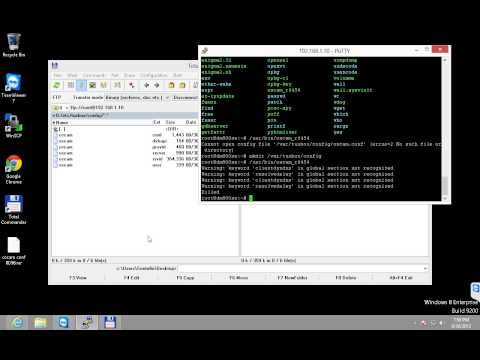
write: telnet your.dream.box.ip (press enter)
Now the telnet consol starts.
write user name: root  (press enter)
write: passwd  (press enter)
write the password you want (press enter)
write your new password again (press enter)

It should look something like this.
It depends on what software and box you are using.
opendreambox 2.0.0 dm7020hd

dm7020hd login: root
root@dm7020hd:~# passwd
Changing password for root
Enter the new password (minimum of 5, maximum of 8 characters)
Please use a combination of upper and lower case letters and numbers.
New password:********
Re-enter new password:********
passwd: password changed.
root@dm7020hd:~#


How To Setup 2 Dreambox For Cardsharing In Lan Or Wan


This guide its to help newbies to setup 2 boxes for Card Sharing in
Lan or Wan.

You need :

2 dreamboxes ( of course)network conected
1 Network cable

a) If you connect the 2 boxes direct you need a cross network cable
if you connect the to boxes in a hub with other network devices then you need straigth network cable
(both of them easy to find in computer stores)
************************************************** ********
Network setup:
Go in dreambox setup-expert setup-network settings and put ip address (something like this)
dreambox1 : ip 192.168.0.1
subnet 255.255.255.0
gateway (ip address of the router)
DNS (ip address of the router)
If you dont have Internet connection leave Gateway and DNS blanc

dreambox2 : ip 192.168.0.2
subnet 255.255.255.0
gateway (ip address of the router)
DNS (ip address of the router)
If you dont have Internet connection leave Gateway and DNS blanc

Check the enable Networking chekbox

If you have a PC thats connect to internet (dialup or adsl) then you can put the pc's ip
as Gateway and DNS server in both boxes to give them internet access

IMPORTAND
If you have a router for the internet the ip of the 2 boxes MUST be in same
network as your router.
Examples:
If the router's Ip address is 10.0.0.1 then your boxes ips MUST be 10.0.0.2 and 10.0.0.3
If your router's IP address is 192.168.1.1 then your boxes MUST be 192.168.1.2 and 192.168.1.3

Now your boxes are connected... and with internet access (if its present)
************************************************** ********
EMU and CardSharing How to:

Install in your boxes one of new images.
I prefer PLi Diamod as gives you the choise to have separate server and client EMU.
In this example we will use as cardserver EMU the NewCS and as client EMU Newcamd
So download and install in the boxes the 2 EMUS (NewCS and Newcamd). If only 1 dreambox
it will act as a server then in the second one you dont need to install NewCS, only NEwcamd

Now we have to to configure the files for the sharing
************************************************** ********
Server configuration of the file Newcs.xml (/var/tuxbox/config)
(in the supplied zip there is a Newcs.xml file for this example)

Open the file with a plain text editor (i use UltraEdit)

Find the section <debug>
and then <udp_host>192.168.0.1</udp_host>
Here you put your server box ip

Then find <udp_port>10000</udp_port>
Here you put servers port

Find the section <newcamdserver>
and then the <name>testserver</name>
Here you put the name of your server (testserver)
Then find <desk€y>01 02 03 04 05 06 07 08 09 10 11 12 13 14</desk€y>
Here you put a login k€y for your users in this format
Then find
<user>
<name>username1</name>
<password>userpas1</password>
<au>on</au>
<spider>No</spider>
</user>
and put user name and password for your users
************************************************** ******************************

Server and client configuration of file Newcamd.conf (/var/tuxbox/config/newcamd)

(in the supplied zip there is a Newcamd.conf file for this example)
Open the file with a plain text editor

Find the line:

CWS = 192.168.0.1 10000 username1 userpas1 01 02 03 04 05 06 07 08 09 10 11 12 13 14 lan testserver

Line parts in plain English
1)192.168.0.1 --- ip address of the server (dreambox acting as server)
(the same as the one defined on newcs.xlm)
2)10000 --- port of the server (the same as the one defined on newcs.xlm)
3)username1 userpas1 --- username and pass of the client (the same as the one defined on newcs.xlm)
4)01 02 03 04 05 06 07 08 09 10 11 12 13 14 --- access code (the same as the one defined on newcs.xlm)
5)lan -- leave this as lan
6)cardserv - name of the cardsharing server (the same as the one defined on newcs.xlm)
************************************************** ******************************

IMPORTAND!!!!!!!!!!!!!!!!!!!!!!!!
Entrys in newcs.xml must be the same in the newcamd.conf
(ip addresses-servername-username-password-desk€y)
All this is case sensitive (username it is not the same with UserName)

After saving transer the 2 files in your Dreambox and restart your boxes...
In lan setups this is ready to work
In wan setups you need a router or a dreambox plugin with DynamicDNS capabilities

You are ready to CARDSHARE thanks allain


How To Reset Your Dreambox Password


How to Reset Dreambox Password


Reset dreambox 500s user and password

The default user and pass on a dreambox 500s is root and dreambox


just found this might help

You can reset your dreambox password using dreambox remote:

1.install tuxbox commander using addons button
2. Start tuxboxcomander
3.go to in /var/etc/ and open the file passwd
4.press 4 on remote to go into edit mode.
The first line is root:*****:0:0:root:/home/root:/bin/sh
where the ****** delete it (by using remote arrows to move cursor right and then pressing volume minus)
delete *** until upto :0:0:root

and press ok and exit -> save

the first line should look like this after the edit
root::0:0:root:/home/root:/bin/sh

then login with user root and password leave empty

you could telnet and change the empty password with your own so known can easily hack into your dm box.

Reset a forgotten password on your dreambox

If you have forget the pass of your dreambox here is how to reset it saving the need to reflash.

1) Install and run TuxBox Commander plugin via your images download manager

2) Choose directory to edit=var/etc/passwd

3) Remove the encrypted password.

--> ATTENTION !!!! THE PASSWD file only !!! NOT the passwd- be careful you dont choose passwd-

3.1) In the file /etc/passwd is the line:
root:b:0:0:root:/root:/bin/sh or something as !!!
root:ililililinsatshares:0:0:root:/roo t:/bin/sh

3.2) the password field is the b or the encripted string ililililinsatshares

3.3) Delete the b or the string the line now is:root::0:0:root:/root:/bin/sh for the DM500

if you are using another DM keep the root as it is you must delete ONLY the string.

4) Save the file and exit

5) Telnet to your DB with root user without password

6) Create a new root password with the command : " passwd "

7) Reboot and password is sucsessfully changed.

Incase this plugin is not available through your images plugin manager i will put it in the downloads section here.To install it ftp to /tmp and manually install with your dm remote.

Reset Your Dreambox Password

Ever forgotten your Dreambox password or other compatible Enigma 1/2 Linux based receivers. This guide will help, no need to wipe the box and reset it up.

First off, you need to have TuxBox commander. You can download it via the Blue panel-Addons-download gemini server-plugins-Tuxcom 1 16.
Once thats installed you can access it through Blue Panel, PLUGINS (Tools).
So hit green or yellow button on your remote and the picture below should appear. As you can see here select tuxbox Commander.


Press the OK key, then navigate to var/ etc. You have two files with the same name (passwd), but you must use the first file (passwd)
Select this file as you can see in the picture below and hit 4 to edit it.

You will then have the following lines as shown in the picture below.
Here you press the OK button and after that you get the next picture


Your root password will obviously be different to the above. What you need to do is replace the first line with this:

root:$1$$34NPeumc9sBBCAw.oUaM80:0:0::/:/bin/sh

And you have to be *exact*.

That resets the password to "dreambox" (without the quotes - password is now dreambox) and you're good to go.

Please note for some users that if you are running gemini v3.9 you have to install the gemini v4.3 because you won't be able to connect with the gemini server.


How To Reset Dreambox Password

This is very easy to do for normal user just follow these steps:

menu
setup
blue panel
addons
download gemini server
plugins
Tuxcom
OK
YES
OK
EXIT ALL
menu
setup
blue panel
Plugins
TuxBox Commander
scroll down to var
OK
scroll down to etc
OK
down to passwd and press 4 (edit)
OK on first line
RED to clear line
enter root::0:0:root:/root:/bin/sh with remote buttons like an writing an SMS
OK
EXIT
save YES
EXIT
save YES
EXIT
EXIT
EXIT
then login with telnet
login root
no pass !


Change Your Dreambox Password With DCC


DREAM BOX


Change Your Dreambox Password With DCC

How to change your password using Dreambox Control Centre

click on telnet then you get a black screen
type on the screen login

root
dreambox if default

then type passwd

then it will give you the option to type a new password be careful because you do not see any letters come on the screen type the password then hit return and retype it again, then you will see password changed.

if you see the bad password: too weak. ignore it and retype the same as you did first.


1. Start DCC and ensure your network is ok and you have green lines to your router and Dreambox.

2. Click on the Telnet Tab.

3. At the prompt type passwd and click enter.


4. Ignore what it states about password length and enter a new password. Any length. Please note the cursor will not move and you will not see what you type, Then press enter.


5. Job Done.


DREAM BOX

How to start:
Start with a click on « Network »
- Select your language
- Select your connection type
- The IP address from the PC tracks down automatically.
- Select the equipment of your Dreambox: Hard disk, CF or USB-Stick
- Select your login and password
- The name of an active DreamFlash-Image will be showed automatically.

You can create, delete and modify your Dreambox Satellite Receiver services.

modify your Dreambox Satellite Receiver ... between the Dreambox and your 

DreamBoxTools - a program for tuning your DreamBox satellite receiver.

your DreamBox satellite receiver. Control your ... : - Lyngsat-to-Dreambox transponders parser 

DVBLink for Dreambox turns your Dreambox into a real MediaCenter!

for Dreambox combines ... available in Dreambox, into ... for Dreamboxturns your Dreambox

DreamboxManagerSuite Version 2 is a tool pack composed out of 5 components.

DreamboxManagerSuite Version 2 is a tool 

This program allows the user to easily select a program in Digiguide.

, that sets a Dreambox to record ... about the Dreambox. It needs ... options, that control the way 

Dreambox Player allows you to stream content to your PC.

Dreambox Player is a ... from your Dreambox Set Top ... Windows PC. Dreambox Player gives 

DreamBoxTools is a program for tuning your DreamBox satellite receiver.

your DreamBox satellite receiver. Control your ... : -Lyngsat-to-Dreambox transponders parser 

The program is designed to stream enigma 2 dreamboxes to PC.

stream enigma 2 dreamboxes (dm7025,dm800 ... set the dreamboxmodel, enter 


Addition of new splash screen with DreamboxUK branding.

Reception of Satellite (DVB-S) and Cable (DVB-C) TV and Radio channels.

, EPG from Dreambox or XMLTV 

It' s a utility that can help you to use the Dreambox software.

Dreambox Server Client ... using the Dreambox software. You 

DreamSET

Free
Dreamset is a settings editor for digital satellite receivers.

support. - DreamBox configuration editor ... motor control from dreamset (dreambox plugin 

This is the tool required to flash your DreamBox hardware.

flash your Dreambox decoders by 

neutrinoTV is a tool for watching live TV on your PC via a Neutrino based dbox.

dbox or dreambox. Hence it ... mode - Completely controlable with keyboard

A program for Windows that enables you to stream your Enigma over the Internet.

your GigaBlue, Dreambox, Vu , ITgate ... Top Box (Dreambox, Vu, etc

Provides access to the largest repository of cell phone flash files.

SCout flasher), DreamBox – DTF, DTA 

You can register S-Card/DreamBox/SCout/Octopus devices and download flash files.

register S-Card/DreamBox/SCout/Octopus 
ToolBox IpBox is a free-to-use flasher tool for Windows OS.

. Main features: - Dreambox editor. - Dreamset 
Search the Web and get a wide choice of useful search engines.

, satellite receivers,dreambox images, satellite 

OSCAM ASCreator - Put N line your Dreambox for Mgcamd/Oscam/Cccam.

N line your Dreambox for Mgcamd 

You can easily install Dreamload Classic in a directory of your choice.

for the Dreambox series ... Media Player Version 1.0 Dreamload’s ... ’s Media Center on Windows 

With this app you can browse the EPG of your Dreambox (or any other Enigma 2 or DVBAPP based sat or.

of your Dreambox (or any ... the current version you can 

Simple Dreambox / Vu+ remote control app.

Simple Dreambox / Vu+ remote control app. ... Solo2 remote control. It ... remote control Same 


Download subtitles in any language for your videos.

file (eg. Dreambox, VU+). - Single 


How to Install on Dreambox Control Center

Most of users are looking for a simple way to manage their receiver boxes via a flexible and well equipped FTP program. Some of you might use Filezilla or any other FTP clients but here we suggest you use the best FTP program which is designed for receiver boxes file management. You can manage or install your images, plugins or any other thing you want to upload or download from your box. One of the most common purposes is uploading/editing CCcam.cfg file.


First of all click here to download the zip folder containing DCC version 2.96


Now extract the folder and open DCC.


1.First assign your box user/pass then the preferred language. Connection Type must also be chosen.

Note: If you connect to your box directly from your laptop/pc choose "Direct Crossover" but a router is on the way "Router" must be chosen.


2.Now you need to assign the proper IP Address of each device.

Note: If you know the correct IP address of your box and router, there is an empty space above the Search button. Mouse over there and type the IP address.

If you dont know the correct IP address, click on Search and let the DCC scan and find the correct IP addresses.

Now I`m going to scan for the right IP address of my box. I click Search

3.At the top you can see the Address range where you can assign the range of IP address which your Network is based on.

My range is 192.168.2.1-254. Clicking on search will start the scanning process.


4.Scanning process is done. 3 IP`s have been found.

the IP ending in 2.1 is my Router, the one with 2.7 is my Box and 2.99 is another device.

So I double click on the second IP in the list to assign it as my box IP in DCC.

Do the same procedure for your Router.

5.Now that we have assigned proper IP`s on my device, we`re gonna click on Reconnect to see if it`s working.


6.All signs show that our connection is healthy and we are connected to our box through our router.

7.So let`s go to the FTP section and see how we can manage our files between pc/laptop and the box.


8.As you can see this section is divided into two halves.

Right side is our Receiver box and the left side is our PC/Laptop.

You can simply exchange between these two using the two arrows in the middle.


 If you keep DCC folder, each time that you open it, it automatically connects to your box and you can do your edits.


How To 

Install CCcam on DM500


Oscam for Dreambox-!


Install CCcam on DM500


OSCAM DreamBox

How to Stream from dreambox to IPTV server and transcoding to H.264/MPEG-4 AVC


Recently Updated